Two ways to skill up your Claude skills
Data is not perfect.
Missing data points, edge cases, wrong formats and wrong transformations. Fixing these problems is hard, especially within enterprise scaled companies.
The data goes through heaps of databases and large code blocks. To find the issue root cause you have to understand the whole data pipeline, sometimes created years ago. Dealing with large code blocks and repositories isn’t a piece of cake: Which part of the pipeline is the bottleneck? Which data elements will change upstream? How can we easily visualise what’s happening?
In this article I would like to dive into the use of Claude skills to easily find the root cause.
What are Claude skills?
Claude skills are reusable prompts in a specific format. They are created to standardize prompting steps. You specify the name and description such that Claude chat or a Claude agent will understand when to use it. Specifying scripts or reference files support the capabilities of the skills. It will create a specific context the Skill works in.
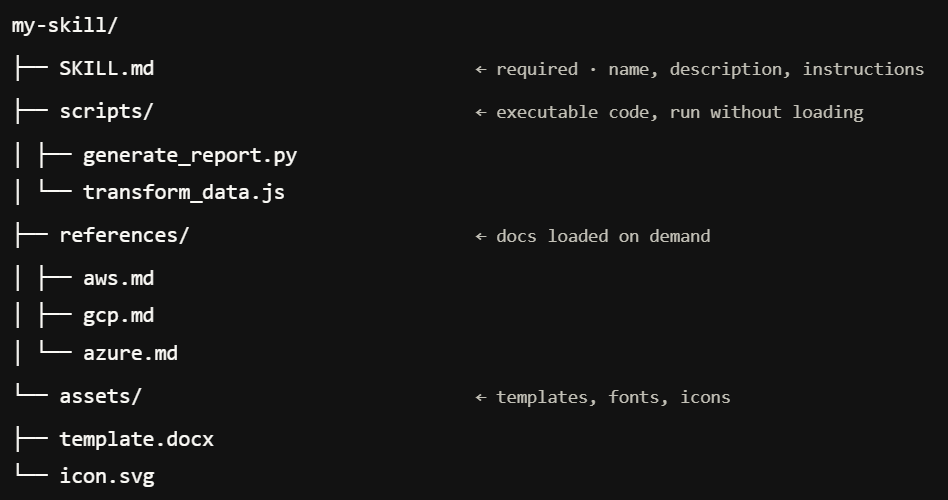
If this is the first time you heard about Claude skills, I can imagine you might be wondering why Anthropic introduced another product. By now we have Claude Chat, Claude Agents, Claude MCPs and Claude skills, just to name a view. What is the difference between all of them?
- Claude Chat is the most standard interface - you can use it to chat with Claude and ask questions.
- Claude Agent uses more context and has the ability to perform autonomous tasks.
- Claude MCPs is an open source standard to connect your AI-tools
- Claude skills are reusable prompts written/created in a standard format.
Compared to a skill, an agent will have a broader context. It will reason more broadly, useful for generic tasks. A skill can be used when you need a specific action to be done. Especially useful when this action has to be accomplished multiple times. Both an agent and skills are easy to share. An MCP is useful if you want to connect a specific (AI) tool. It will give the agent or skill the ability to communicate with the tool more easily. It will either retrieve or send data from and to the tool or it might perform an action (for example retrieve product information or buy a product at a website).
If you want to know more about creating skills, please checkout these links, documented by Anthropic itself:
-
https://docs.claude.com/en/docs/agents-and-tools/agent-skills/overview.md
-
https://docs.claude.com/en/docs/agents-and-tools/agent-skills/best-practices.md
-
https://docs.claude.com/en/docs/claude-code/sub-agents.md
Claude skills in sequence
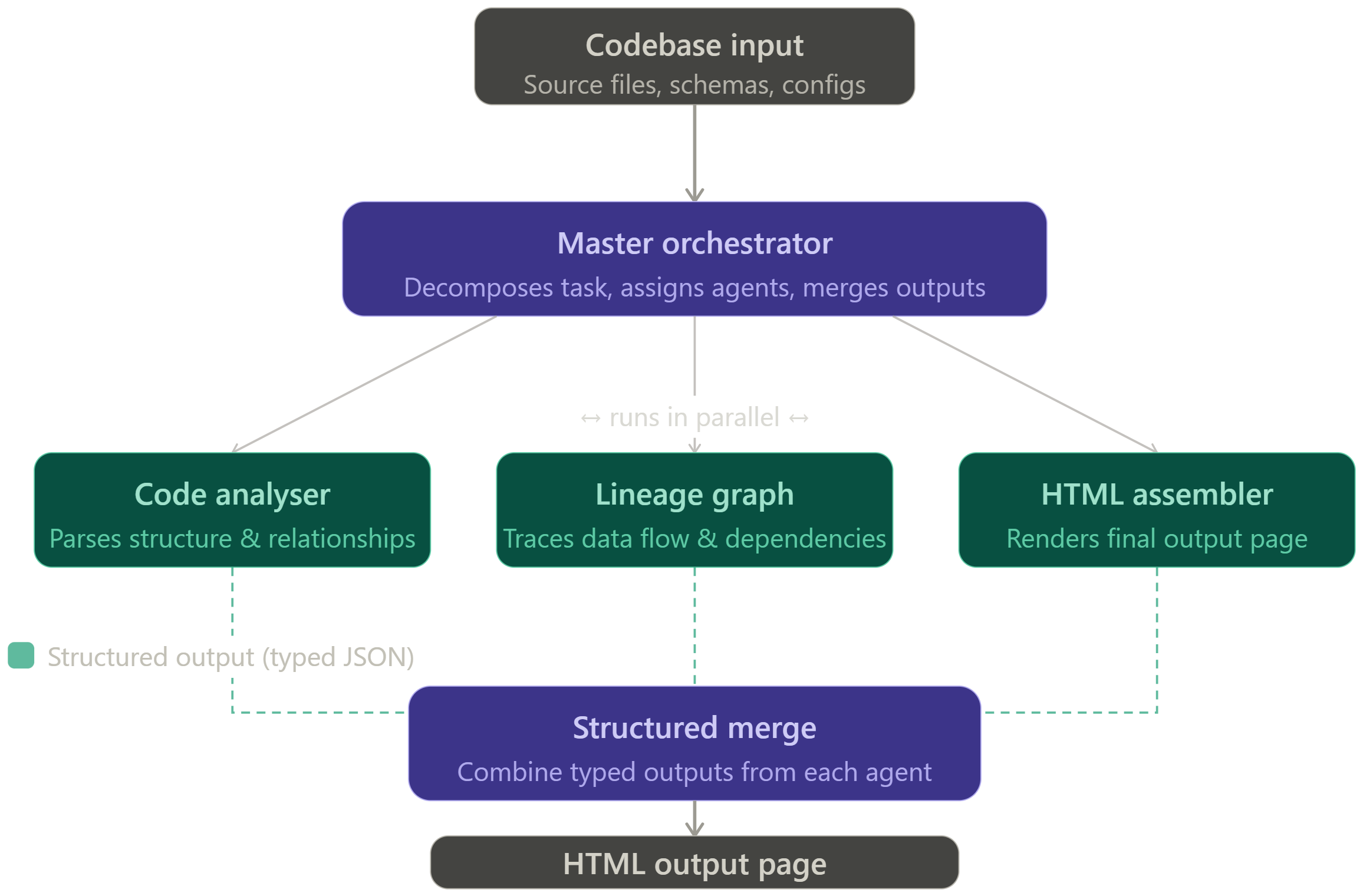
The best use of skills emerges when using a sequence of multiple skills. Running multiple skills after each other reduces the need for multiple prompts. Using skills in sequence doubles the benefit: prompts are standardized and you only have to initiate the sequence once. You just drop the code into your skill sequence as a first input and violà. The process I have build analyses the code first, then creates a data lineage graph and lastly shows the lineage as an html page.
However, when I reached a sequence of around 15 skills, it took to long and there was too much variety. To solve this I created agents to orchestrate the thought process and to kick off multiple skills. I created a code analyser agent, an agent that would create a data lineage graph and an agent that would put it all together into an html page. Using agents in combination with skills helped to keep the structured output while maintaining performance and a thorough thought process.
What did I learn while creating this process?
1. Use valuable intermediate outputs
You need a structured output when working with multiple skills in sequence. The structured output will reduce hallucination in the next step. According to the Claude documentation you could best use markdown or JSON. These formats are useful as input and output, because they are standard and do not require a lot of tokens. The LLMs reads them easily.
There are two ways to pass the output from skill to skill: (1) using the agent context, so the agent passes it from skill to skill using his thought context (2) the second way to standardize the output even more is by updating a static file. Insert a task per skill to save its output in a shared file. The next agent will read the file as input, perform additional changes an stores its output back into the file again.
2. Add a state to your workflow
Lastly, you can add a status report and pass it along from skill to skill. An example could be a timestamp, a sequence number and a brief description of its actions. This status object can be used by the next skill to understand what happened before and it could be used to debug the steps during the run. This is extremely helpful to optimize your agentic workflow and to enhance the workflow pipeline.
Using Claude to optimize code
Data lineage is not a goal in itself. Its not a problem we want to solve. The data quality issue is the problem to solve. The lineage is the first step. An LLM would use the lineage as context to determine where the data quality issue may reside. Breaking down the code into a data lineage structure is necessary for a good recommendation. Its necessary for a good semantic understanding of the code base.
Will a handful of Claude skills solve all data problems? No it will not.
It will be one step closer to a fully automated agentic way of handling your data. It will be the first step of analysing complex date pipelines. In later stages it might find data gaps on the fly. Agentic checks will definitely be a standard way to verify data in your pipeline. But before we reach a period in which enormous amounts of Agentic code will be the default, we need to optimize our Claude skills as best as possible. So focus on valuable intermediate outputs and on a state within your workflow and you will solve some of your data issues.